Disney's 12 principles of animation with examples, from squash and stretch to appeal, each mapped to camera work, After Effects easing and AI-generated video.
Method. Checked November 18, 2026 against John Lasseter's 1987 SIGGRAPH paper, the Frank and Ollie website, Adobe's After Effects help, the VideoPhy, PhyGenBench, Physics-IQ, VBench and Kang et al. papers, and Google's Veo prompt guide; the book itself was not available to us, and AI-specific claims not backed by a paper are labelled as our observation. Vinc makes an AI film studio.
Where the twelve principles come from
The 12 principles of animation are the working rules of movement, from squash and stretch to appeal, that Disney animators taught as "rules of the trade." Frank Thomas and Ollie Johnston published them in Disney Animation: The Illusion of Life (Abbeville Press, New York, 1981); John Lasseter's 1987 SIGGRAPH paper traces them to the studio between "the late 1920's and the late 1930's."
We quote Lasseter's paper (with examples from Pixar's Luxo Jr. and The Adventures of André and Wally B.) and the Frank and Ollie website, not the book. Each principle gets a definition plus, where they add something, notes for camera, motion graphics (part 12) and AI video; AI notes are our observation.
The 12 principles of animation at a glance
Lasseter lists eleven, omitting solid drawing because a 3D model already has volume. Seven "apply in the same way for both types of animation."
#
Principle
One-line definition (Lasseter, 1987)
Transfers to 3D
1
Squash and stretch
"Defining the rigidity and mass of an object by distorting its shape during an action"
Applied differently
2
Anticipation
"The preparation for an action"
Same
3
Staging
Presenting an idea so that it is unmistakably clear
Same
4
Straight ahead and pose to pose
"The two contrasting approaches to the creation of movement"
Applied differently
5
Follow through and overlapping action
"The termination of an action and establishing its relationship to the next action"
Same
6
Slow in and slow out
"The spacing of the inbetween frames to achieve subtlety of timing and movement"
"The action of an object resulting from another action"
Same
9
Timing
"Spacing actions to define the weight and size of objects and the personality of characters"
Same
10
Exaggeration
"Accentuating the essence of an idea via the design and the action"
Same
11
Solid drawing
Form, weight, volume and "the illusion of three dimension" (Frank and Ollie site)
Not in Lasseter's list
12
Appeal
"Creating a design or an action that the audience enjoys watching"
Applied differently
The 12 principles of animation, with examples
1. Squash and stretch
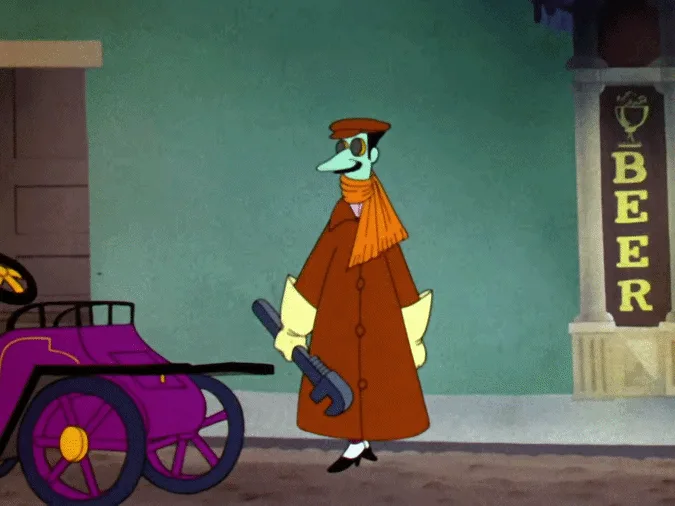
Definition. Squash and stretch shows an object's rigidity and mass by distorting its shape, while "its volume remains constant." Lasseter calls it "the most important principle": a half-filled flour sack squashes when dropped and stretches when lifted, but "it never changes volume."
Camera: fast motion strobes between frames. "Accurate motion blur is the most realistic solution to this problem of strobing," and stretching does the same job; on set, shutter angle sets the blur (see Frame Rate, Shutter Angle and Motion Blur).
Before
Smear
After
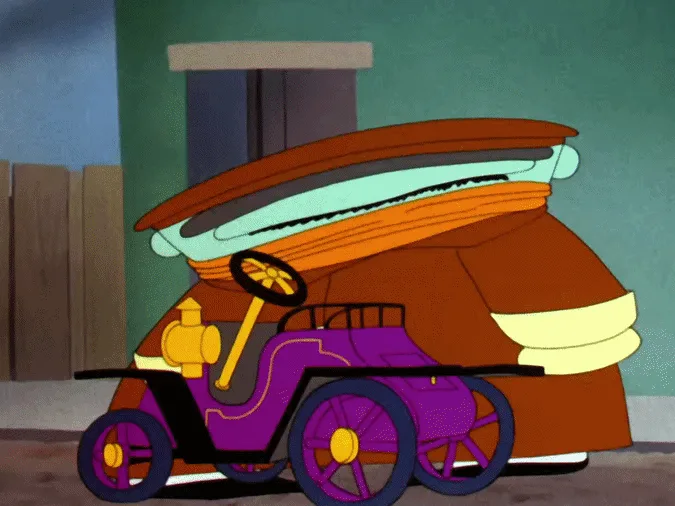
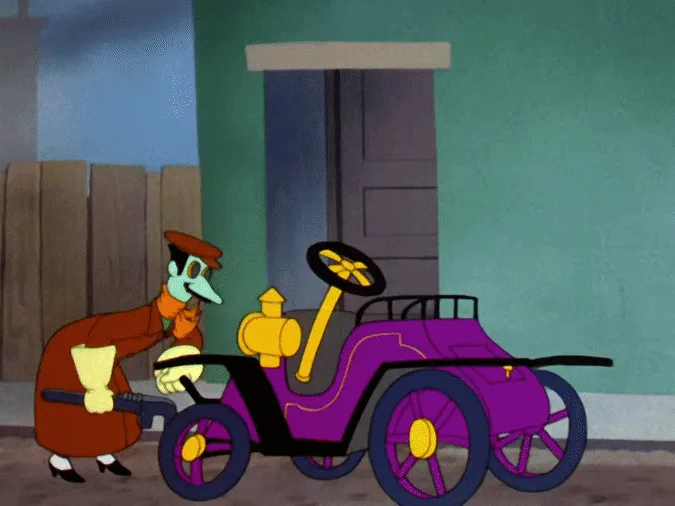
The character starts upright, is drawn as one stretched, distorted shape mid-move, then lands crouched by the car.The Dover Boys at Pimento University (1942), Chuck Jones. Public domain (US).
Motion graphics: "When scaling up in Z, the object should be scaled down in X and Y to keep the volume the same."
2. Anticipation
Definition. Anticipation is the preparation for an action: "a foot must be pulled back before it can be swung forward to kick a ball." It also tells the audience what is coming; Wally B.'s zip off screen "is only 3 or 4 frames long, but he anticipates the zip long enough for the audience to know exactly what is coming next."
Camera: a reaction shot before a reveal does the same job, as Dad's offstage look does before Jr. hops in.
AI video: generated jumps and throws often start with no wind-up (our observation); models "fail to abstract general physical rules" (Kang et al., 2024). Write the preparation in: "crouches, then leaps."
3. Staging
Definition. "Staging is the presentation of an idea so it is completely and unmistakably clear," one idea at a time. Disney animators learned "it is always better to show an action in silhouette."
Camera: "the effective use of long, medium, or close up shots, as well as camera angles also helps in telling the story" (Frank and Ollie page).
The long, medium and close shots the Frank and Ollie page mentions, as the standard sizes from extreme close-up to extreme wide.
AI video: generated shots often animate everything at once, splitting attention (our observation). In Luxo Jr., "only Dad or Jr. was doing an important action at any one time, never both."
4. Straight ahead and pose to pose
Definition. Straight ahead means drawing frame after frame from the start, with "spontaneity and freshness" but a risk to "size, volume, and proportions." Pose to pose is "more planned out and charted with key drawings done at intervals," and suits "animation that requires good acting."
Motion graphics: keyframes are pose to pose by construction; a wiggle() expression is straight ahead.
AI video: a model generates the whole clip at once, more like straight ahead (our observation); first-and-last-frame tools give it two poses to hit.
5. Follow through and overlapping action
Definition. Follow through and overlapping action describe loose parts that "move at a slower speed and 'drag' behind the leading part," then keep moving after it stops: "The heavier they are the farther behind they drag and the longer they take to settle." Snow White's dress "catches up a few frames later."
Motion graphics: offset each part's keyframes by a frame or two.
AI video: hair and cloth can stop dead with the body or move with no driving force (our observation); Physics-IQ (2025) concluded "visual realism does not imply physical understanding."
6. Slow in and slow out
Definition. "Slow in and slow out deals with the spacing of the inbetween drawings between the extreme poses": "more drawings near the starting pose, one or two in the middle, and more drawings near the next pose."
Camera: grips ease dollies and cranes in and out for the same reason (our illustration).
Motion graphics: After Effects' Easy Ease sets "a speed of 0 with an influence of 33.33% on either side" of a keyframe.
Our arithmetic: a one-second move at 24 fps with Easy Ease. Most of the frames cluster near the two poses; the middle passes quickly, as Lasseter describes.
7. Arcs
Definition. "The visual path of action from one extreme to another is always described by an arc," mechanical devices excepted. With one spline for both path and timing, a fast action "flattens out: the faster the action, the flatter the arc."
Camera: an arc shot, in which "the camera moves in a circular or semi-circular path around the subject" (Veo guide), and a crane both trace arcs.
An arc circles the subject and a crane swings the camera around its pivot; both put the camera itself on an arc.
Motion graphics: After Effects sets path and speed interpolation separately, so you can bend a path without changing its timing.
8. Secondary action
Definition. Secondary action is defined as "An action that results directly from another action," like Luxo Jr.'s rippling cord. It "is always kept subordinate to the primary action."
Camera: change expression "before, or after" a big move, because "a change in the middle of a major move will go unnoticed."
AI video: name one primary action and describe the rest as its result (our illustration).
9. Timing
Definition. Timing is the number of frames an action takes: "More than any other principle, timing defines the weight of an object." "Most animation is done on twos (one drawing photographed on two frames of film) or on ones": 12 or 24 drawings a second at 24 fps (our arithmetic).
In Thomas and Johnston's head-turn exercise, two poses mean different things depending only on the inbetweens between them:
Same two poses, different number of inbetweens (Thomas and Johnston, quoted by Lasseter 1987)
Hit by a tremendous force0
Hit by a brick or frying pan1
Nervous tic, muscle spasm2
Dodging a brick3
Crisp order: "Get going!"4
Friendlier: "Over here"5
Sees something they want6
Tries for a better look7
Searching a shelf8
Appraising, thoughtful9
Stretching a sore muscle10
Source: Lasseter, SIGGRAPH '87, quoting The Illusion of Life. Labels paraphrase the book's meanings.
Four inbetweens, a crisp order; ten, a slow stretch.
AI video: frame rates are fixed, so timing is set by words: the Veo guide lists "slow-motion," "fast-paced action" and "time-lapse."
10. Exaggeration
Definition. Exaggeration "does not mean arbitrarily distorting shapes or objects"; it pushes the essence: "If a character is sad, make him sadder." Keep it consistent: "If just one thing is exaggerated in an otherwise lifelike scene, it will stick out." In Luxo Jr., "The ironic effect of all this exaggeration was to make the film more realistic."
AI video: the Veo guide's own example asks for "a slightly exaggerated, whimsical form."
11. Solid drawing
Definition. Solid drawing applies "form, weight, volume solidity and the illusion of three dimension" to animation (Frank and Ollie page). Lasseter omits it because a 3D model already holds its form from every angle.
AI video: objects and faces can change shape or identity across a clip (our observation); VBench (2023) measures "subject identity inconsistency."
12. Appeal
Definition. "Where the live action actor has charisma, the animated character has appeal": "a quality of charm, pleasing design, simplicity, communication, or magnetism." Lasseter warns against "twins," where "both arms and both legs are in the same position," which looks "stiff, wooden."
Camera: two actors in identical poses look staged.
AI video: generated subjects are often symmetrical and centred (our observation); ask for asymmetric poses.
Why generated motion misses some principles
VideoPhy (2024) found the best model it tested followed both caption and physical laws in 39.6% of cases; PhyGenBench (2024) found "simply scaling up models or employing prompt engineering techniques is insufficient." None tests anticipation, arcs or overlap by name, but the principles make a good checklist for reviewing a generated clip frame by frame (our reading).
How we compiled this
Definitions come from Lasseter's 1987 paper and the Frank and Ollie page (book quotations as quoted by Lasseter; Wikipedia only for the chapter's pages, 47–69 in the 1997 Hyperion edition), After Effects behaviour from Adobe and AI findings from arXiv abstracts. Arithmetic and anything marked our observation or illustration are ours. Checked 18 November 2026.
Sources
Frank Thomas and Ollie Johnston, Disney Animation: The Illusion of Life, Abbeville Press, New York, 1981 (as cited and quoted by Lasseter, 1987; principles chapter pp. 47–69 in the 1997 Hyperion edition, per Wikipedia)
John Lasseter, "Principles of Traditional Animation Applied to 3D Computer Animation," Computer Graphics 21(4), Proceedings of SIGGRAPH '87, July 1987, pp. 35–44 (PDF, UC Irvine course copy)
Aspect Ratios in Film Explained: 1.33 to 2.39 and 9:16, With the History and Delivery Specs
Aspect ratios in film are width divided by height. See where 1.375, 1.85, 2.39, 16:9, IMAX and 9:16 came from, and the containers cinemas and Netflix expect.