The animation pipeline is the fixed order a feature is built in: story, art, modelling, surfacing, rigging, layout, animation, simulation, lighting, rendering.
Method. Checked November 18, 2026 against Pixar's The Science Behind Pixar exhibition site, Pixar in a Box on Khan Academy, Walt Disney Animation Studios' process pages, Autodesk's Maya 2024 help, SideFX's Houdini docs, Pixar's RenderMan 27 docs, the OpenUSD documentation, and blocking guides from Animation Mentor and AnimSchool; the frame arithmetic is ours. Vinc makes an AI film studio.
The animation pipeline process in one picture
The animation pipeline is the chain of departments an animated film passes through, in order, each working on what the one before handed over: a model must exist before it can be rigged, a rig before it can be animated. Pixar's touring exhibition The Science Behind Pixar names nine steps; Walt Disney Animation Studios publishes a longer list grouped into development, asset creation and shot production. The order is the same.
The CG feature pipeline in the order Pixar's exhibition and Disney Animation's process pages describe it; animation is where most of this lesson's vocabulary lives.
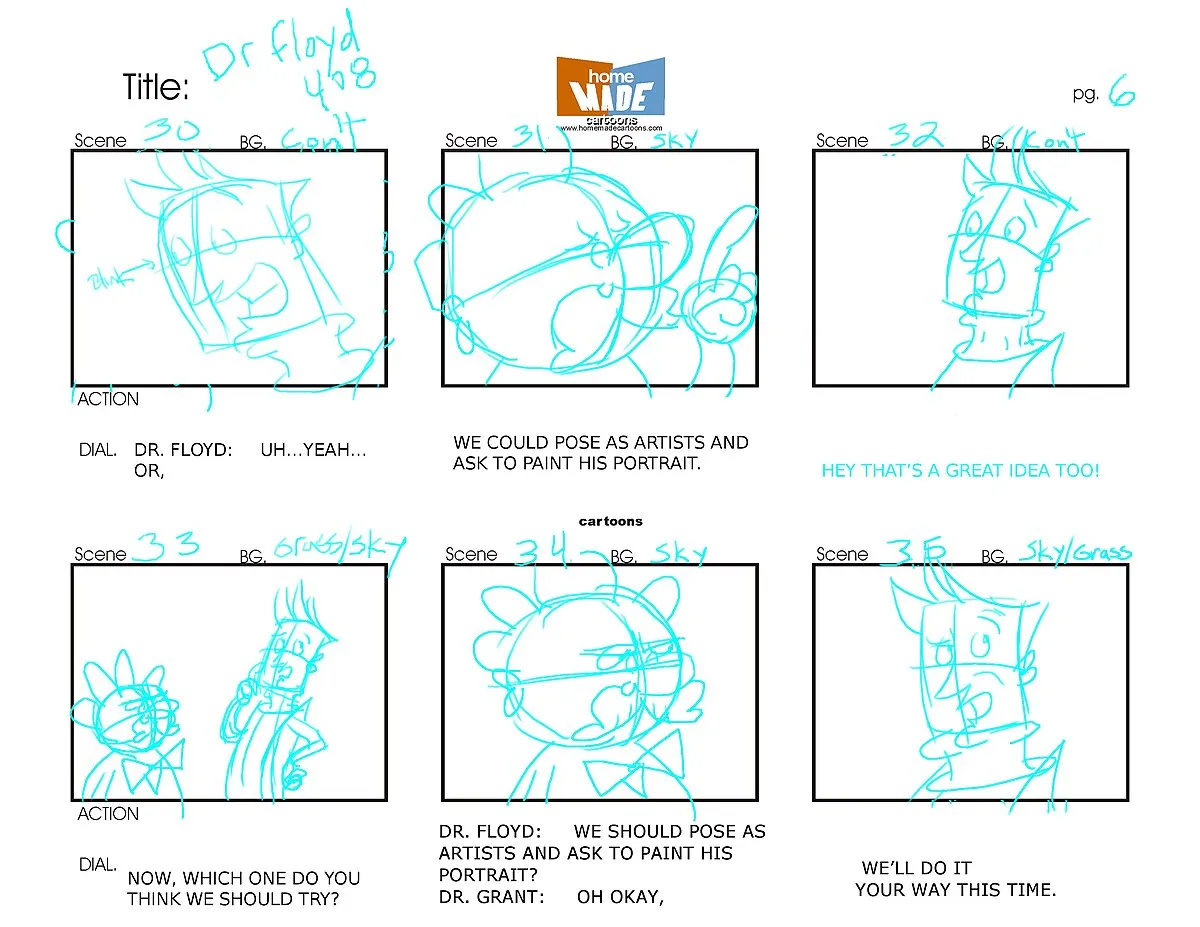
Storyboards are, in Pixar's definition, "sketches that convey the story of a movie, one drawing at a time." Disney Animation says storyboarding dates to the Walt Disney Studios of the 1930s; its story artists start with thumbnails from the script and refine them into clearer drawings with tone and shading.
Storyboard
A storyboard page with six numbered panels, each with rough character drawings and dialogue written underneath.Storyboard by Tom Ray for The Radio Adventures of Dr. Floyd, Wikimedia Commons, CC BY-SA 2.0.
Pixar in a Box, the free course Pixar made with Khan Academy, defines a story reel as "a rough draft of the film in video form that includes storyboards, added recorded dialogue, sound effects, and music." The general name is an animatic; its 3D successors are covered in Previs, Postvis and Techvis. Disney's editors cut the reel with temp sound and music, so the film is cut long before most of it is animated.
Art and visual development
Pixar's exhibition lists what the art department produces:
Art product
What it is for
Pixar example cited
Concept art
Defines characters and environments
Woody and Buzz (Toy Story), grass (A Bug's Life)
Colour script
Sets each scene's colour palette and explores lighting
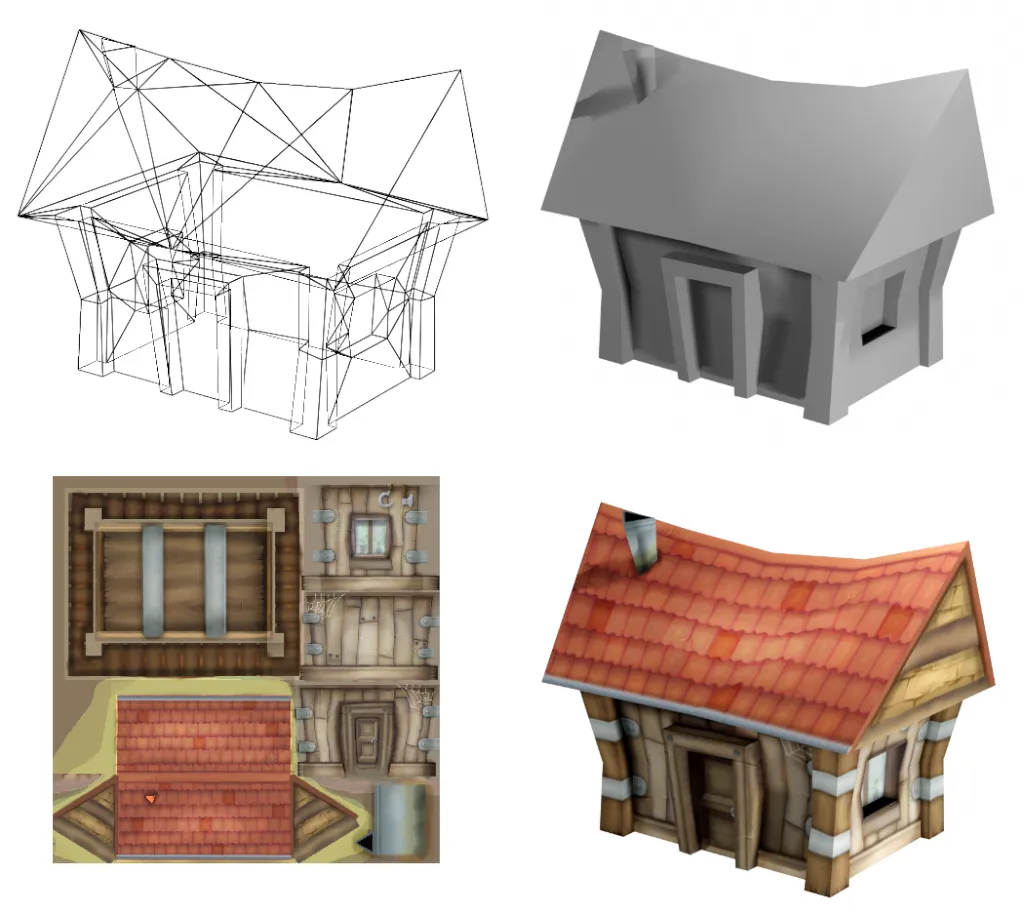
Modelling builds a digital model, which Pixar's exhibition defines as a virtual wireframe made of points and the edges connecting them. Artists often start from sketches and clay maquettes, and the mesh is densest where the form is complex, such as around Luca's Giulia's nose and mouth.
Modelling
One 3D house shown as a wireframe, as a grey shaded model, as its flat texture map, and fully textured.Drummyfish, Wikimedia Commons, CC0 (public domain dedication).
Surfacing, shading and look development
"A virtual 3D model is just a shape, the surface is how it appears," says The Science Behind Pixar. Surface shaders are programs that create colour, pattern and texture; Mater from Cars has one for base brown, one for rust, one for the gleam in his eyes. Disney calls the job look development, covering "the color, textures, and materials for everything you see in the final rendered images."
Rigging
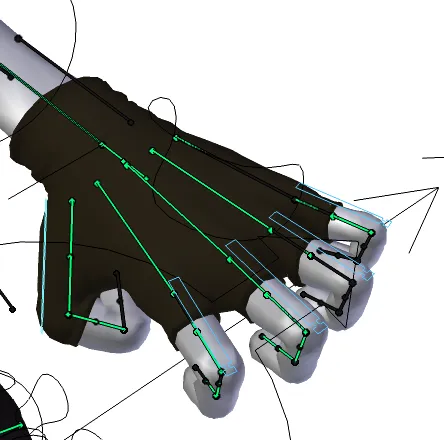
A rig is "the virtual bones, joints, and muscles that allow models to move," in Pixar's definition. It controls how a joint bends and how the skin around it stretches and folds, like marionette strings: too few controls limit the poses, too many slow posing down.
Rigging
A character's hand with its rig visible: green bone chains run through the palm and each finger.Sintel model by Angela Guenette, rig by Ben Dansie, render by Fama Clamosa. Wikimedia Commons, CC BY-SA 3.0.
Riggers study how a character should move (Randall in Monsters, Inc. moves like a chameleon but walks on two legs) and build hundreds of control points for animators. At Disney this is the character technical directors' job.
Layout: sets, cameras and staging
Layout builds the virtual sets and cameras for each shot and sets the staging and rough motion. Pixar's camera artists, "the cinematographers of the virtual world," choose composition, camera movement and lens. At Disney, layout stages and shoots the film shot by shot from the cut storyboards, producing the first 3D version "in a full cinematic form," with rough character motion and temporary lights.
"Animation is a series of images, each slightly different from the last, shown in sequence," says Pixar's exhibition. In CG, animators set key poses and the software fills the frames between with mathematical functions called splines, as Pixar scientist Tony DeRose explains on the exhibition site.
The passes a CG shot usually goes through inside the animation department, from the descriptions by Animation Mentor and AnimSchool.
Keys, breakdowns and in-betweens
Key frames are the frames that "mark important positions" (Pixar). Breakdowns are intermediate poses that shape how the character gets from key to key, and the remaining frames are in-betweens.
Blocking and stepped keys
Blocking is the first animation pass, using only keys and breakdowns. "The purpose of blocking is to verify that the keys and breakdowns you have chosen to explain your idea work, i.e. proof of concept," writes Animation Mentor's Drew Adams (April 2018). He recommends stepped mode, where each pose holds until the next pops on; in Maya, a stepped tangent "forces the animation curve to hold its value from the one key to the next key".
The reason is timing. In spline mode, "by the time you get to frame 12 the curves are already halfway to the next key. Your pose is 50% gone." At 24 fps (see Frame Rate and Shutter Angle):
24 frames ÷ 24 fps = 1.0 s on screen (stepped)
pose already halfway gone by frame 12 = 12 ÷ 24 = 0.5 s (spline)
Blocking plus
AnimSchool describes blocking plus as taking "another pass at your blocking" before hitting spline, refining timing and arcs to avoid the "cringey, floaty movement" of converting raw key poses straight to spline.
Splining
Splining converts the curves from stepped to smooth interpolation and lets the computer generate the in-betweens. Maya's tangent options:
Maya tangent
What the curve does (Autodesk's description)
Typical use Autodesk gives
Stepped
Holds its value until the next key
A strobe light switching on and off
Spline
Smooth through the key; in and out tangents co-linear
"An excellent place to start" for fluid movement
Clamped
Spline, except linear between keys with near-equal values
Stops foot and pelvis slipping in a walk cycle
Plateau
Like spline, but never overshoots its keys
A ball rolling off a table that must not go through the floor
Polish
Polish is the name schools give the last passes on a shot, where overlap, follow-through and slow in and out are finished curve by curve (our summary). Adams: if blocking was done well, "finishing off the shot can be a breeze."
Simulation and effects
Some motion is not keyed at all. Pixar defines simulation as automated motion produced by programs: character-driven effects such as hair and clothing, and natural phenomena such as fire and water. Simulation technical directors "start with a physics-based simulator, but then they fine tune it."
Disney splits it into technical animation (cloth and hair on characters) and effects animation (fire, water, wind and earth); for falling snow it used Houdini's MPM solver to simulate "millions" of particles. Live-action equivalents are in Film Terms: VFX.
Set dressing and set extension
Set dressing fills a set with objects that make it believable; Pixar generates grass procedurally because a field has "millions of blades of grass." Disney's set extension artists build the digital backgrounds around the characters, such as Frozen 2's fields and mountains, work meant to be "imperceptible to the audience." The live-action equivalent is in Production Design Terms.
Lighting
Lighting is where "the bright work lights have been replaced with final lighting," in Pixar's words: "Light shows you where to look and enhances the emotional feel of each scene." Disney's lighting artists work from the visual development colour keys. The vocabulary carries over from live action; see Lighting Terms Explained.
Rendering
Rendering turns the 3D scene (models, shaders, animation, simulation, lights and camera) into the 2D image, calculating the colour of every pixel.
Figure
As stated by
Notes
About 50 hours to render each frame of the Luca scene shown
The Science Behind Pixar (exhibition site, read November 2026)
Per frame; the site does not say on how many cores
2,000 machines and 24,000 cores in Pixar's render farm
The Science Behind Pixar
Described as one of the 25 largest supercomputers in the world; the site does not date the figure
Monsters University took two years to render
The Science Behind Pixar
Even with the farm above
About 400 years for a 100-minute film on one machine, at about 24 hours per frame
A reader's calculation, answered on the same site
Illustrates why render farms exist
The reader's arithmetic checks out: 100 min × 60 s × 24 fps = 144,000 frames × 24 h ≈ 394 years.
A render produces more than the final picture. RenderMan defines Arbitrary Output Variables (AOVs) as "the secondary images produced by the renderer", such as depth, normals and motion vectors.
Compositing
Compositing assembles those passes and separate elements into the final frame; at Disney the lighting artists "assemble the elements of a shot into a complete composite." The general vocabulary is in Film Terms: Motion Graphics and Compositing.
What holds the pipeline together
Every handover is a file, and each application once had its own scene format. Pixar's answer is Universal Scene Description (USD), now open source: one scene description that departments layer edits onto without overwriting each other. The OpenUSD docs give the history:
System
First used
What it added
A single program file per shot
Toy Story
Starting point
Marionette (Menv)
A Bug's Life
Referencing, layering, variation
Presto
Brave and every later feature
Composition unified in one text format and engine
USD
Project started 2012
Presto's composition engine with the data model of TidScene, a 2008–2009 caching system
"USD is roughly the fourth generation of 'composed scene description' developed at Pixar," the documentation says.
How a 2D animation pipeline differs
In our summary, 2D shares the story front end, has no direct equivalent of the 3D asset stages, and maps closely on animation passes. Adams notes that a 2D "pose test" is "the equivalent of a stepped playblast since there are no in-betweens created yet." The next module, non-fiction, starts with Documentary Terms.
How we compiled this
Stage definitions come from Pixar's The Science Behind Pixar, Pixar in a Box and Disney Animation's process pages; tool behaviour from Autodesk, SideFX, RenderMan and OpenUSD documentation; blocking practice from Animation Mentor and AnimSchool. We found no primary, dated source for frame counts or render hours of specific features, so none are included. Everything was checked on 18 November 2026.
Atmosphere, Light Quality and Texture: Hard vs Soft Light, Haze, God Rays, Rain and Practicals
Haze, god rays, rain, moonlight, neon, crushed blacks and wet streets each describe something physical: particles in the air, the sun's angle, a gas's emission lines, a black point or the angle at which water reflects. This article defines each term with figures from meteorologists, physicists, manufacturers and cinematographers, then shows how the Google, LTX, Luma, Kling and Runway prompt guides phrase it.