Exposure explained: stops, the exposure triangle, EI, dynamic range, false colour, log vs Rec.709, bit depth, chroma subsampling and codecs, in numbers.
Method. Checked November 18, 2026 against makers' own documents (Apple's ProRes white paper, ARRI, Sony, RED and Blackmagic specification pages), ITU standards pages and cited reference summaries; bit-depth counts, pixel totals and stop multiples are our arithmetic. Vinc makes an AI film studio.
Exposure: how much light reaches the sensor
Exposure is the total amount of light a frame records. On a cinema camera, aperture, shutter and sensitivity control it, ND filters cut light before any of them, and all four are measured in stops.
Stop
A stop is a doubling or halving of light. Cinematographer Steve Yedlin describes closing down one stop as every point in the image receiving half the light it did before. Three stops is 2 × 2 × 2 = 8 times the light; ten stops is 1,024 times.
Lens f-numbers (1.4, 2, 2.8, 4, 5.6, 8, 11, 16) are one stop apart. Each is the previous times about 1.4, the square root of 2, because light passed depends on the opening's area.
Each step from f/1.4 to f/16 halves the area of the opening, so each step is one stop less light.
Exposure triangle
The exposure triangle is a teaching model showing that aperture, shutter and sensitivity can be traded against each other, stop for stop, while exposure stays the same. Each corner also changes something else in the picture:
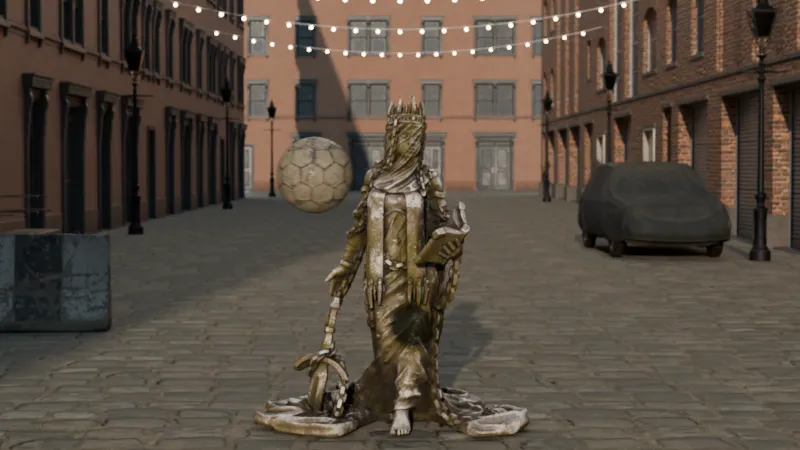
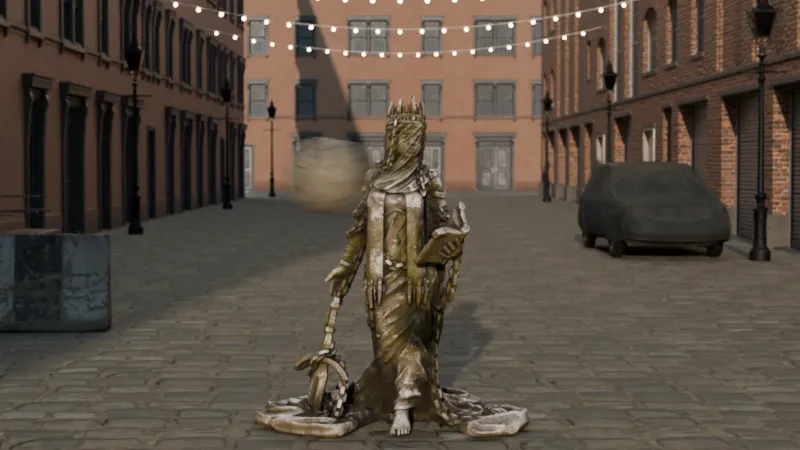
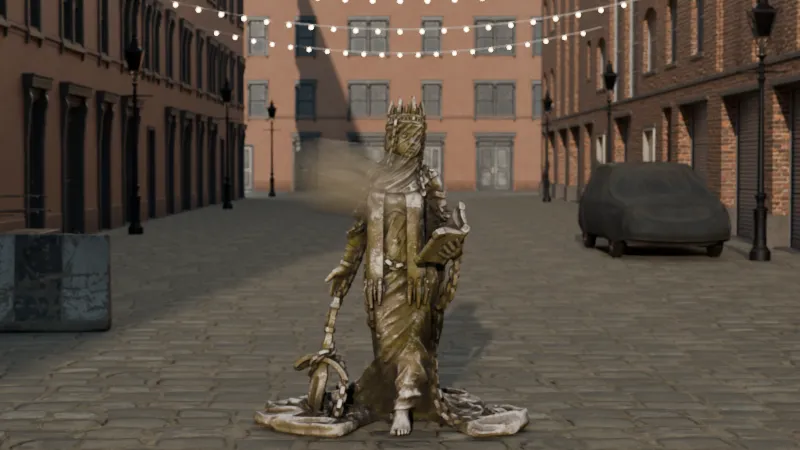
The shutter's side effect: a football crossing at 8 m/s, 4.5 m away, at 24 fps. 45° (1/192 s) freezes it, 180° (1/48 s) gives the usual blur, and 360° (1/24 s) smears it. Exposure is equalised here; on set, 45° is two stops darker than 180°. Rendered in Vinc's virtual camera lab (35 mm, full frame, f/4).Scene: CC0 Poly Haven assets (Football by Amal Kumar; Gothic Statue by Benny Weimer).
Aperture, shutter and sensitivity each change exposure in stops, and each has a side effect: depth of field, motion blur or noise.
In a prompt, name the side effect you want ("shallow depth of field", "motion blur on the passing cars"), not the setting. Google's Veo prompt guide lists "shallow depth of field" as a lens effect.
ISO, EI and native (base) ISO
The exposure index (EI) is the speed rating film is metered at; Kodak rates VISION3 500T at EI 500 under tungsten. On most digital cinema cameras, ISO or EI doesn't change how much light the sensor collects, only how the signal is interpreted. RED: "ISO only affects how the RAW data is interpreted."
A higher ISO places more range above middle grey, giving "more insurance against clipped highlights"; a lower ISO keeps more below, with less shadow noise. Native or base ISO is where the sensor's analogue chain is designed to work. Sony's VENICE 2 8K sensor has dual base ISO 800 and 3200 (the 6K sensor 500 and 2500); ARRI rates the ALEXA 35 from EI 160 to EI 6400.
Dynamic range and latitude
Dynamic range is the span, in stops, between the darkest level a sensor records with usable detail and the brightest before it clips. A 17-stop claim means the brightest value is 2¹⁷, about 131,000, times the darkest. Latitude is how far a shot can be mis-exposed and still be corrected.
Makers blur the two: ARRI says the "ALEXA 35 measures at 17 stops of dynamic range (exposure latitude)"; Sony gives the VENICE 2 8K "16 stops of latitude." Methods differ, so a one-stop gap between spec sheets proves little; our cameras and sensors guide compares the claims.
Stated dynamic range or latitude, in stops
ARRI ALEXA 3517 stops
Sony VENICE 2 (8K)16 stops
Blackmagic URSA Cine 12K LF16 stops
Makers' own figures: ARRI ALEXA 35 product page; Sony VENICE 2 product page (8K sensor at base ISO 3200); Blackmagic URSA Cine 12K LF tech specs. Methods differ between makers.
Clipping
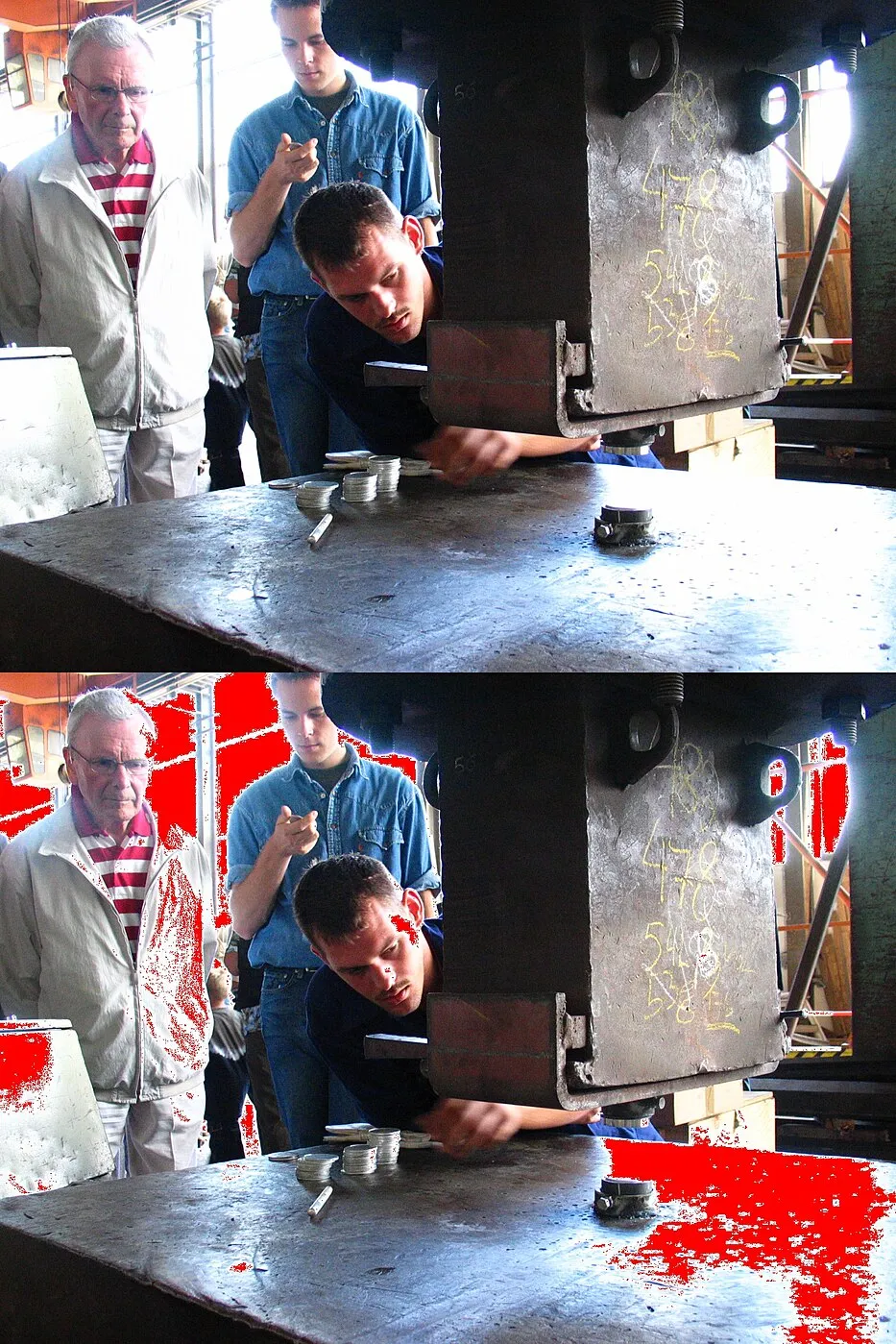
Clipping happens when part of the image is brighter than the highest value the sensor or file can record. Every pixel past that point stores the same maximum, so its texture is gone and can't be recovered in the grade.
Clipping
The same image twice: in the lower copy, the areas that hit pure white are marked in red.Photo: Daniel Schwen, Wikimedia Commons, CC BY-SA 2.5.
RED's "traffic lights" turn on when about 2% of the pixels in a single colour channel clip, catching cases like red clipping in a skin tone.
Middle grey (18%)
Middle grey is the tone that looks halfway between black and white, usually defined as 18% reflectance. The 50% lightness point of CIELAB corresponds to a luminance of 18.4%. Meters, grey cards and exposure tools use it as the reference: Ed Lachman's EL Zone System maps exposure in stops "using 18% gray as the reference exposure."
Reading exposure on set: false colour, zebras and waveforms
The camera's processed picture can mislead; these tools turn brightness and colour into patterns you can read.
False colour
False colour shows the image in black and white with colours laid over tone bands, "superimposed onto a monochrome version of the original scene," in RED's words. In RED's video mode, green marks 18% grey, pink typical Caucasian skin, yellow and orange highlights, and blue nearly textureless black. Colours aren't standardised between makers, so read the legend for your camera.
Zebras
Zebras are diagonal stripes drawn over parts of the image above, or within, a set brightness level. RED notes highlight zebras were traditionally set around 70 IRE, where white paper starts to lose texture. They read the output picture at the current ISO and look, not the raw data.
Waveform, vectorscope and histogram
These are the measurement displays carried over from broadcast engineering, which plot the picture's brightness, colour or tonal spread as a graph so exposure can be judged by numbers rather than by eye.
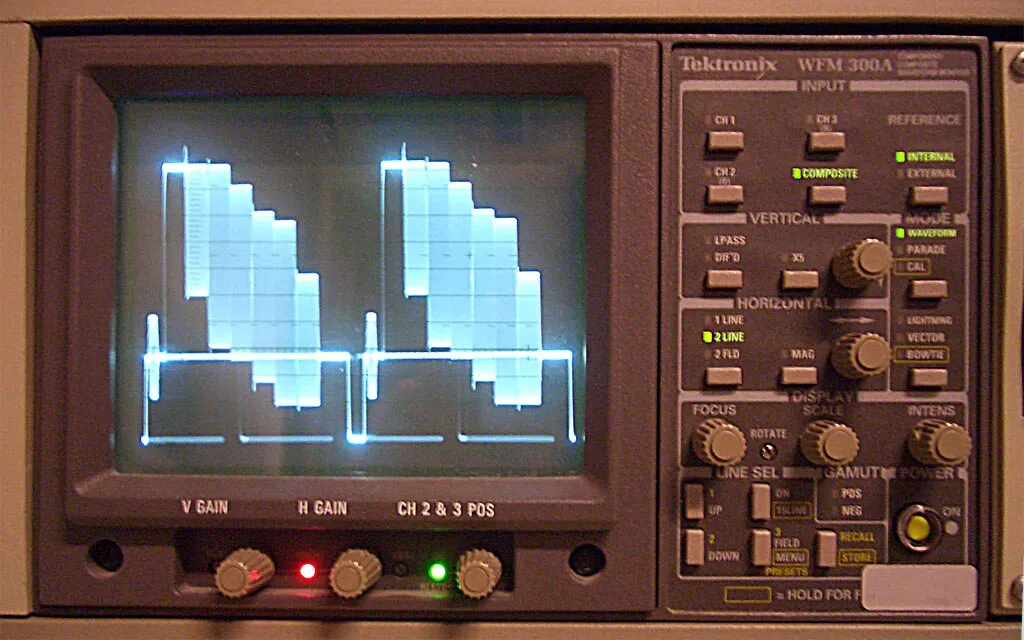
Waveform
A waveform monitor displaying colour bars as stepped blocks of brightness.Photo: grm_wnr, Wikimedia Commons, CC BY-SA 3.0.
Waveform monitor: plots signal level (brightness) across each line of the picture, so a bright window on the right of the shot appears as a high trace on the right.
Vectorscope: a circular plot of chrominance; angle is hue, distance from centre is saturation.
Histogram: counts pixels by tone, shadows left and highlights right. It shows how much of the frame sits at each level, but not where.
ND (neutral density) filter
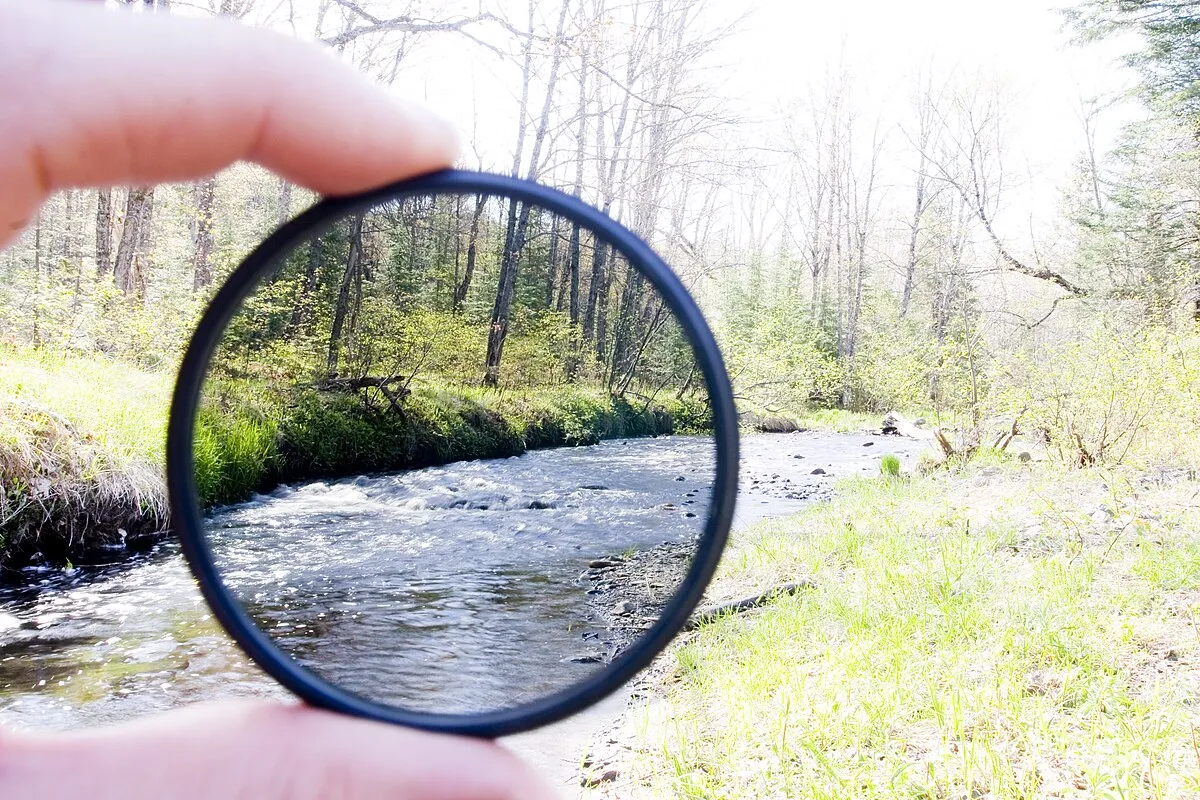
An ND filter cuts all visible wavelengths by the same amount, darkening the image without changing its colour, so you can keep your chosen aperture and shutter in bright light. Strength is written as optical density; each 0.3 is one stop:
Seen through the filter held up to the stream, the scene is darker but its colours are unchanged.Photo: Robert Emperley, Wikimedia Commons, CC BY-SA 2.0.
Sony's VENICE 2 builds in an eight-step ND that runs from 0.3 ("1/2 = 1 stop") to 2.4 ("1/256 = 8 stops").
Log vs Rec.709, RAW and codecs: how the picture is stored
After light hits the sensor, the camera chooses a tone curve, raw or processed data, bit depth, colour detail and codec. Grading terms built on these are in Colour Grading Terms, Explained.
Log vs Rec.709
Rec.709 (ITU-R BT.709) is the HD television standard: a display-ready image that looks correct on a normal HD screen. A log curve stores brightness logarithmically to pack more stops into the file, so it looks flat until transformed for display, usually with a 3D LUT.
ARRI says Rec 709/2020 "cannot hold as much highlight information as the much flatter Log C curve," which is why it isn't offered as a recording space on the ALEXA Mini LF, ALEXA 35 or ALEXA 265.
RAW vs compressed video
RAW stores the sensor's data before demosaicing, white balance and ISO interpretation; compressed video (ProRes, H.264, H.265) stores finished pictures with those decisions baked in. RAW is usually compressed too: Blackmagic RAW offers ratios from 3:1 to 18:1 on the URSA Cine 12K LF.
Bit depth
Bit depth is the number of bits used to store each value per colour channel. n bits give 2ⁿ levels per channel, and three channels give that number cubed:
Bit depth
Levels per channel
RGB combinations
Where you see it
8-bit
256
16,777,216
H.264 proxies on the URSA Cine (8-bit 4:2:0)
10-bit
1,024
1,073,741,824
ProRes 422 family
12-bit
4,096
68,719,476,736
ProRes 4444 and 4444 XQ (up to 12 bits)
16-bit
65,536
281,474,976,710,656
Sony X-OCN
More levels make skies and skin less likely to band when pushed hard in the grade.
Chroma subsampling (4:4:4, 4:2:2, 4:2:0)
Chroma subsampling stores colour (chroma) at lower resolution than brightness (luma), because the eye is less sensitive to colour detail. RED's definitions:
4:4:4: "no chroma subsampling". Colour is kept at full resolution.
4:2:2: "each horizontal scanline has 2 chroma values for every 4 luma values". Colour is halved horizontally.
4:2:0: two chroma samples per scanline, "only present every other line". Colour is halved both horizontally and vertically.
Counting samples in a 4 × 2 block of pixels (our arithmetic): 4:4:4 stores 24, 4:2:2 stores 16 (two-thirds) and 4:2:0 stores 12 (half). The loss matters most for green-screen keys and hard colour edges.
Codec: ProRes, H.264, H.265
A codec is the method used to compress and decompress the picture. Apple ProRes compresses each frame on its own, which makes it easy to edit. Apple's April 2022 white paper gives these target data rates (first column at 1920 × 1080):
ProRes flavour
Mbps at 29.97 fps
Mbps at 3840 × 2160, 24p
422 Proxy
45
145
422 LT
102
328
422
147
471
422 HQ
220
707
4444 (no alpha)
330
1,061
4444 XQ (no alpha)
500
1,591
Apple ProRes target data rates at 1920 × 1080, 29.97 fps
422 Proxy45 Mbps
422 LT102 Mbps
422147 Mbps
422 HQ220 Mbps
4444330 Mbps
4444 XQ500 Mbps
Apple ProRes White Paper, April 2022. ProRes 422 HQ is about 99 GB per hour at this size and rate.
H.264 and H.265 are delivery codecs that compress across groups of frames: much smaller files, harder to edit. H.265 is generally reported to give about 25–50% better compression than H.264 at the same quality.
Pixels, sensors and shutters
Resolution names: HD, UHD and DCI 4K
Name
Pixels
Defined by
HD (1080)
1920 × 1080 (2.07 million)
ITU-R BT.709, the HDTV parameter standard
UHD ("4K" TV)
3840 × 2160 (8.29 million)
ITU-R BT.2020, SMPTE ST 2036-1
DCI 4K container
4096 × 2160 (8.85 million)
Digital Cinema Initiatives specification
DCI 4K flat
3996 × 2160 (1.85:1)
SMPTE ST 429
DCI 4K scope
4096 × 1716 (about 2.39:1)
SMPTE ST 429
UHD is exactly twice HD in each direction; DCI 4K is 256 pixels wider than UHD. See also Aspect Ratios, Explained.
Frame size vs sensor area
Frame size is the pixel count of the recorded file; sensor area is the chip's physical size in millimetres. The ARRI ALEXA 35 has a 27.99 × 19.22 mm Super 35 sensor with 4608 × 3164 photosites, about 14.6 million. Sensor area, not pixel count, decides field of view and depth of field for a given focal length.
Physical sensor area to scale. Pixel count is a separate number; a large sensor can record a small frame and a small sensor a large one.
Rolling vs global shutter
A rolling shutter reads the sensor out row by row, as most CMOS sensors do, so the top and bottom of the frame are exposed at slightly different times. Fast subjects "appear angled or sheared" (RED), fast camera moves wobble, and strobes can light only part of the frame.
Rolling shutter
Shot from a phone camera in flight, the spinning propeller blades appear bent into curved shapes.Photo: Dicklyon, Wikimedia Commons, CC BY-SA 4.0.
A global shutter exposes every photosite at the same moment, so none of these appear. RED's V-RAPTOR [X] 8K VV lists its sensor as a "35.4MP Global Shutter CMOS."
Moiré and aliasing
Moiré is a false pattern of bands or colour fringes that appears when the scene has detail finer than the sensor can sample, such as fine fabric. RED describes aliasing as "jagged edges, interference patterns ('moiré') and other false detail." An optical low-pass filter (OLPF) prevents it at the cost of slight softening.
Noise
Noise is random variation in pixel values that the scene didn't contain, coming from the light itself and the sensor's electronics, and most visible in shadows and flat areas. On RAW cameras like RED's, a lower ISO "will decrease the appearance of noise, particularly within the shadows."
Noise
A dim shot of stacked papers on a shelf shows grainy speckle across the darker areas.Photo: Lugiadoom, Wikimedia Commons, public domain.
A typical exterior day setup (our illustration, not a prescribed workflow):
Set the shutter to 180° for normal motion blur.
Pick the aperture for the depth of field the shot needs, say T2.8.
Rate the camera at its base EI.
Add ND (for example 1.2, four stops) until false colour shows skin near its expected band and the sky isn't clipped.
Record log or RAW so the grade has the full range.
Pick a codec and bit depth that survive the grade (10-bit 4:2:2 or better).
In a prompt, describe the result, not the settings: "a backlit window, the bright sky outside held with detail, the face in soft shadow."
How we compiled this
Definitions and numbers come from makers' own documents (Apple's ProRes white paper, ARRI, Sony, RED and Blackmagic), with encyclopaedic summaries for middle grey, ND density, resolution standards, scopes and H.265. Bit-depth counts, stop multiples, pixel totals and chroma sample counts are our arithmetic. Everything was checked on 18 November 2026.
How these images were made. Images captioned "Rendered in Vinc's virtual camera lab" are simulations, not photographs. They are path-traced in Blender's Cycles renderer, in a street scene built from CC0 Poly Haven models and a Poly Haven sky (named in each credit). The camera is physical: real sensor widths and focal lengths, a thin lens with a 9-blade iris, shutter-angle motion blur, and exposure set from an 18% grey card at the subject. They show what the optics predict. They don't model lens aberrations, sensor noise or any camera maker's colour science. The scripts and asset list are in our repository under scripts/blog-renders.
Aspect Ratios in Film Explained: 1.33 to 2.39 and 9:16, With the History and Delivery Specs
Aspect ratios in film are width divided by height. See where 1.375, 1.85, 2.39, 16:9, IMAX and 9:16 came from, and the containers cinemas and Netflix expect.